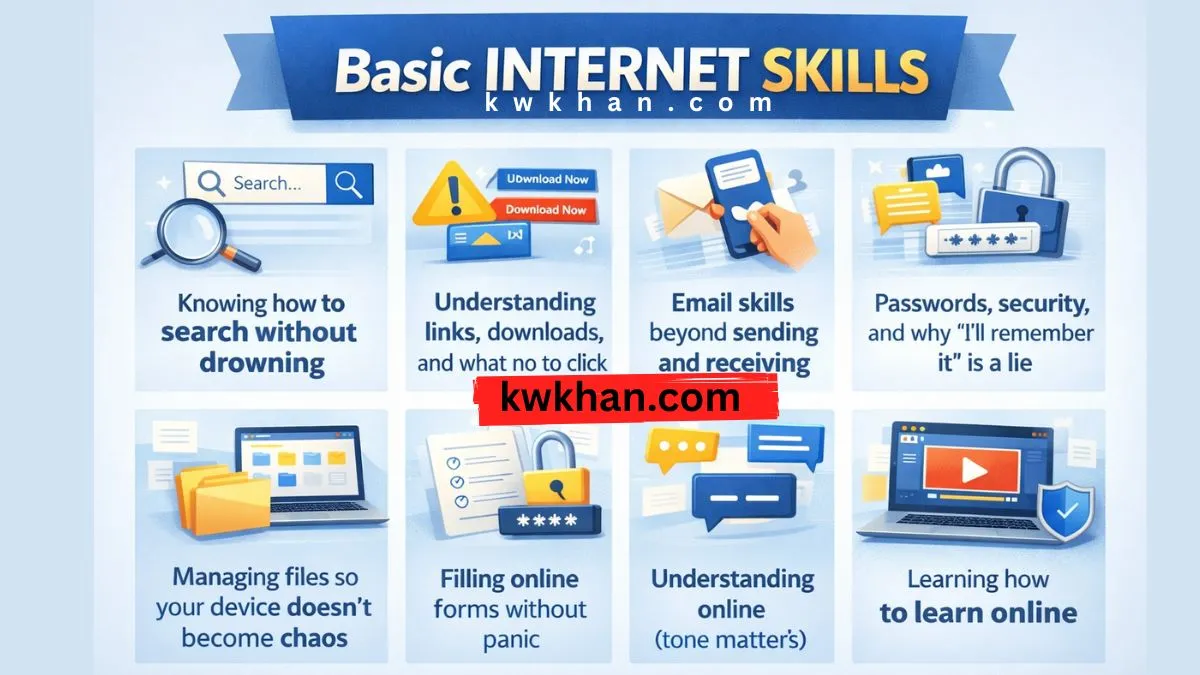
Basic internet skills that every person should have

I still remember the first time I had to book something online by myself. No help. No tutorial. Just me, a slow internet connection, and that quiet feeling that I was probably about to mess something up.
I did, by the way.
Entered the wrong email. Never got the confirmation. Spent almost an hour blaming the website before realizing the mistake was mine. That kind of realization sticks with you.
That’s usually how people learn basic internet skills anyway. Not from neat courses or step-by-step guides. From small, annoying failures that pile up over time, until one day you stop making the same ones.
Over the last 5–10 years, I’ve watched people struggle with the internet in ways that have nothing to do with intelligence. Smart people. Capable people. People who handle complex things offline without blinking. They just never had to think about how the internet actually works. And once everything moved online—bills, forms, jobs, banking, learning—those gaps quietly started to hurt.
This isn’t a checklist. I don’t really believe in those for this kind of thing. It’s closer to what I wish someone had casually explained to me earlier, maybe over a cup of tea, without making it sound like a lesson.
Knowing how to search without drowning
Most people “know” how to use Google. Or at least they think they do.
They type full questions. Or very vague words. Or one long, desperate sentence and hope the internet magically understands what they mean. Sometimes it works. Often it doesn’t. And when it doesn’t, people assume the answer just isn’t there.
One mistake I made early on was trusting the first result every single time. Big error. Sponsored links look convincing. Old articles still rank. Forums from 2012 somehow get treated like timeless truth.
What actually helped me was learning to rephrase searches. Shorter. Clearer. Add one specific word. Remove another. Try again. The internet responds to precision, not frustration.
And yes—scrolling past the first few results matters more than people like to admit.
Understanding links, downloads, and what not to click
This part is usually overlooked. Almost everyone skips it.
A link isn’t just a link. Some open pages. Some start downloads. Some… really shouldn’t be touched at all.
I once downloaded what I thought was a simple PDF guide. Turned out to be a shady installer bundled with things I didn’t ask for and definitely didn’t need. Cleaning that mess took longer than reading the guide ever would have.
Basic digital literacy is noticing small things:
File extensions
Buttons screaming “Download Now” a little too loudly
URLs that look almost right but not quite
Your browser isn’t your enemy. Blind trust, though? That can be.
Email skills beyond sending and receiving
Email looks simple. It isn’t.
From what I’ve seen, people lose opportunities here more than anywhere else. Wrong subject lines. Empty bodies. Attachments forgotten. Replies sent to the wrong thread. It happens more than anyone wants to admit.
I learned—slowly—to reread before hitting send. Especially when I’m tired. Especially when emotions are involved. Definitely when attachments are involved.
Knowing how to search old emails, create folders, spot phishing attempts, and switch tone depending on who you’re writing to—these aren’t “advanced” skills. They’re just how you stay functional online.

Passwords, security, and why “I’ll remember it” is a lie
I used the same password for years. Email. Social media. Random websites I forgot even existed.
Nothing bad happened… until it did.
Once an account is compromised, the cleanup feels endless. Password resets. Notifications. That low-level anxiety that something else might break later, even after you think you’ve fixed it.
Basic online safety isn’t about paranoia. It’s about habits. Strong passwords. A password manager if you can tolerate one. Two-factor authentication where it actually matters.
This part feels boring. Almost unnecessary.
Until it suddenly isn’t.
Managing files so your device doesn’t become chaos
If your desktop looks like a dumping ground, you’re not alone. Mine did too. For years.
But the moment you start doing anything serious online—forms, uploads, sharing documents—disorder costs time. Real time. The kind you feel.
Learning where files download. Renaming them properly. Creating folders that make sense to you, not to some imaginary “organized person.” Backups. Cloud storage basics.
This is one of those skills that feels optional… right up until you urgently need a file and can’t find it.
Filling online forms without panic
Forms scare people more than they should. I’ve seen it up close.
I’ve watched someone abandon an application just because the form looked long. Not difficult. Just long. The length alone felt overwhelming.
Reading instructions slowly helps. Saving drafts helps. Knowing that you can usually refresh without breaking everything helps more than people realize.
One small warning here: never rush forms that involve money, identity, or official data. Speed creates mistakes. Mistakes create stress.
I’ve been there. More than once.
Understanding online communication (tone matters)
Text removes tone. That causes problems.
I’ve seen harmless messages turn into arguments because someone read them the wrong way. Short replies feel rude. Long ones feel overwhelming. Emojis help sometimes. Hurt sometimes.
Basic internet skills include learning how your words land on a screen, not just how they sound in your head.
Ask yourself once before sending: “How could this be misunderstood?”
That pause saves relationships.
Knowing when something feels off
This one isn’t technical. It’s instinctive.
Scams. Fake offers. Too-good-to-be-true deals. Urgent messages demanding action right now. The pressure is usually the trick.
One habit that helped me: step away for ten minutes. If it’s real, it’ll still be there. If it’s not, the urgency was the whole game.
Trust that quiet feeling in your gut. It gets sharper with experience.
Learning how to learn online

This might be the most important one, honestly.
Tutorials, videos, forums, documentation—the internet teaches everything. But it doesn’t teach how to filter.
I wasted years jumping between resources, half-learning things, blaming myself for not “getting it.” Turns out the problem wasn’t me. It was the noise.
Pick one source. Follow it through. Ignore the rest for a while. Progress feels slow at first, then suddenly obvious.
That pattern repeats everywhere online.
The funny thing is, none of these skills feel impressive. Nobody brags about managing email properly or spotting a bad link.
But once you have them, the internet stops feeling hostile. It becomes a tool instead of a threat. You move with more confidence. Fewer small disasters. Less background stress.
And every now and then, when someone asks you for help and you actually know what to do, you realize how far you’ve come. Quietly. Without noticing when it happened.
Q1. What does basic internet skills mean?
Basic internet skills don’t just mean using Facebook or WhatsApp.
It means understanding and using the internet effectively — like searching for the right information, avoiding fake links, using email properly, filling out online forms without hesitation, and keeping your information safe.
Often, people think they are using the internet, but the internet is actually using them. That’s the difference.
Q2. Can internet skills be learned without taking a course?
Yes. Absolutely.
To be honest, I’ve learned more things by making mistakes myself than from courses.
Clicking on the wrong link, sending the wrong email, forgetting passwords — these are all free lessons.
Courses help, but daily use + a little attention + a little patience works even better.
Q3. What is the most common mistake people make while using the internet?
The most common mistake is trusting too quickly.
The first Google result, a flashy “Download” button, or an urgent message — people click without thinking.
Anything on the internet that forces you to make a quick decision is usually the riskiest.
Taking a moment to pause, looking at the page, checking the URL — these small habits can save you from big problems.
Q4. Why are basic internet skills so important in today's world?
Because almost everything has gone online.
Forms, bills, jobs, learning, banking — everything.
If your basic digital skills aren’t strong, the problem isn’t with the internet… it’s with dependency.
You have to depend on someone else for every little thing, and that’s the most frustrating part.
The internet becomes powerful when you are in control.